
From The Workbench
The Screen Wasn’t the Whole Phone
A liquid-damaged Galaxy Note20 5G, a close inspection of its parts, and a path back to the owner's data. A recovery story about patience with partial function.
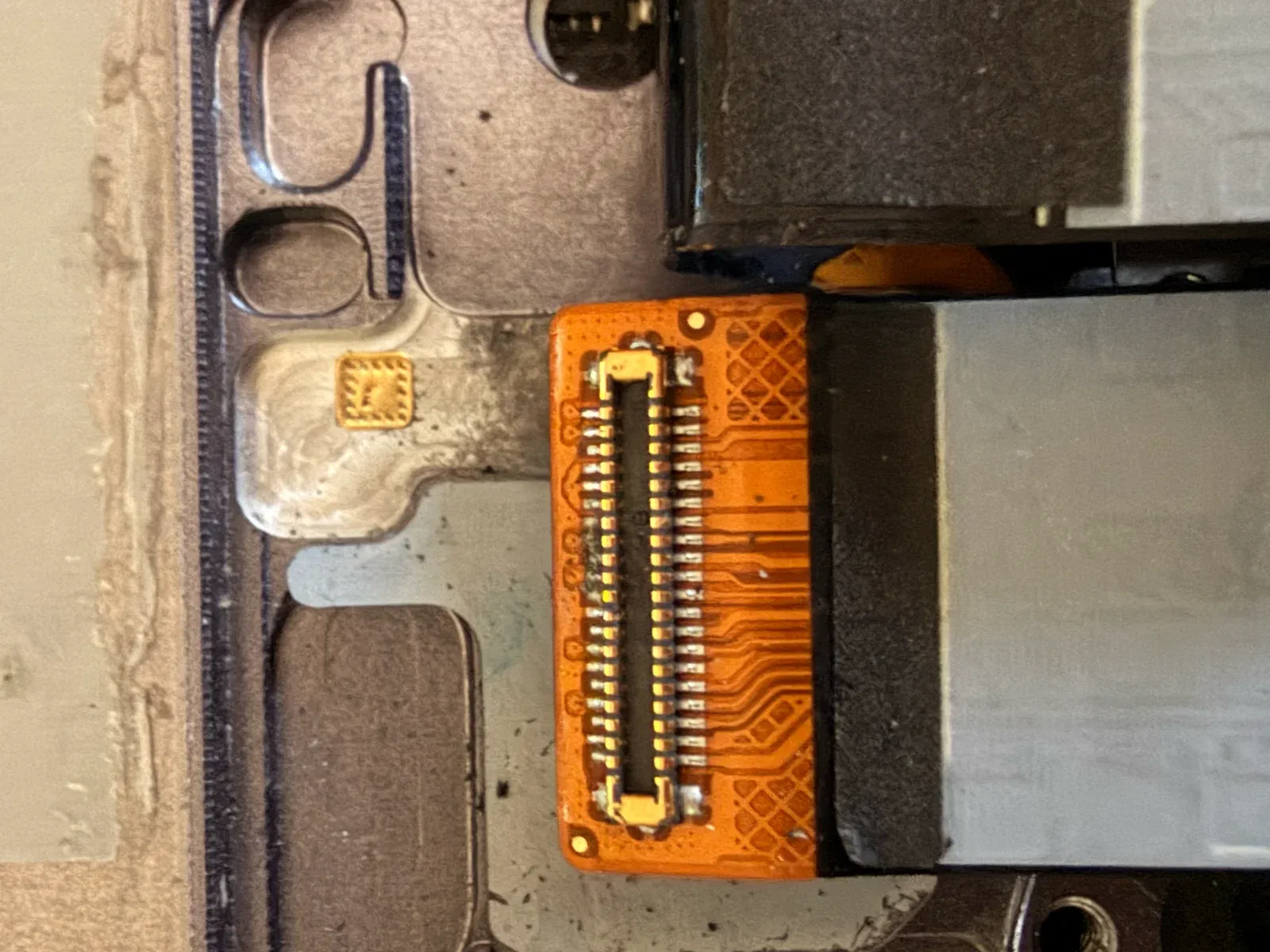
Close inspection of a phone flex connector and its individual contacts. Photograph: theProject.
A phone can stop looking alive before everything inside it has stopped working.
That distinction mattered in a liquid-damage recovery for a local client. The goal was not to make a dramatic repair photograph or return the device to showroom condition. It was to get the owner's data back without making the damage worse along the way.
The device was a Samsung Galaxy Note20 5G. The recovery record identifies it as SM-N981U, a model identifier also covered by Samsung's Note20 support material. That detail is less glamorous than the photographs, but it keeps the story attached to the device that was actually on the bench.
The owner's data was ultimately recovered. Getting there meant taking the phone apart, examining its connections, and finding a working route back to its files. The photographs capture the physical investigation. A later terminal screen records the phone responding to requests and copying files.
The interesting story is how a phone stops being one apparently dead object and becomes a set of smaller questions.
The display was not the whole phone
Most of what we know about a phone comes through its screen. When that screen fails, it is natural to describe the entire device as dead.
Inside, the display, charging connection, battery, main board, and connecting cables have different jobs. A failure in one part can hide the continued operation of another. The storage does not become readable just because the display is removed, but a failed display does not by itself establish that the stored data has been destroyed.
That is the first useful change in perspective. Instead of asking only whether the phone works, ask which parts can still do their jobs and which connections remain dependable.
The recovery photographs include removed display assemblies and exposed internal connections. They make that separation visible. What normally arrives as one sealed object is now a collection of parts with different responsibilities.
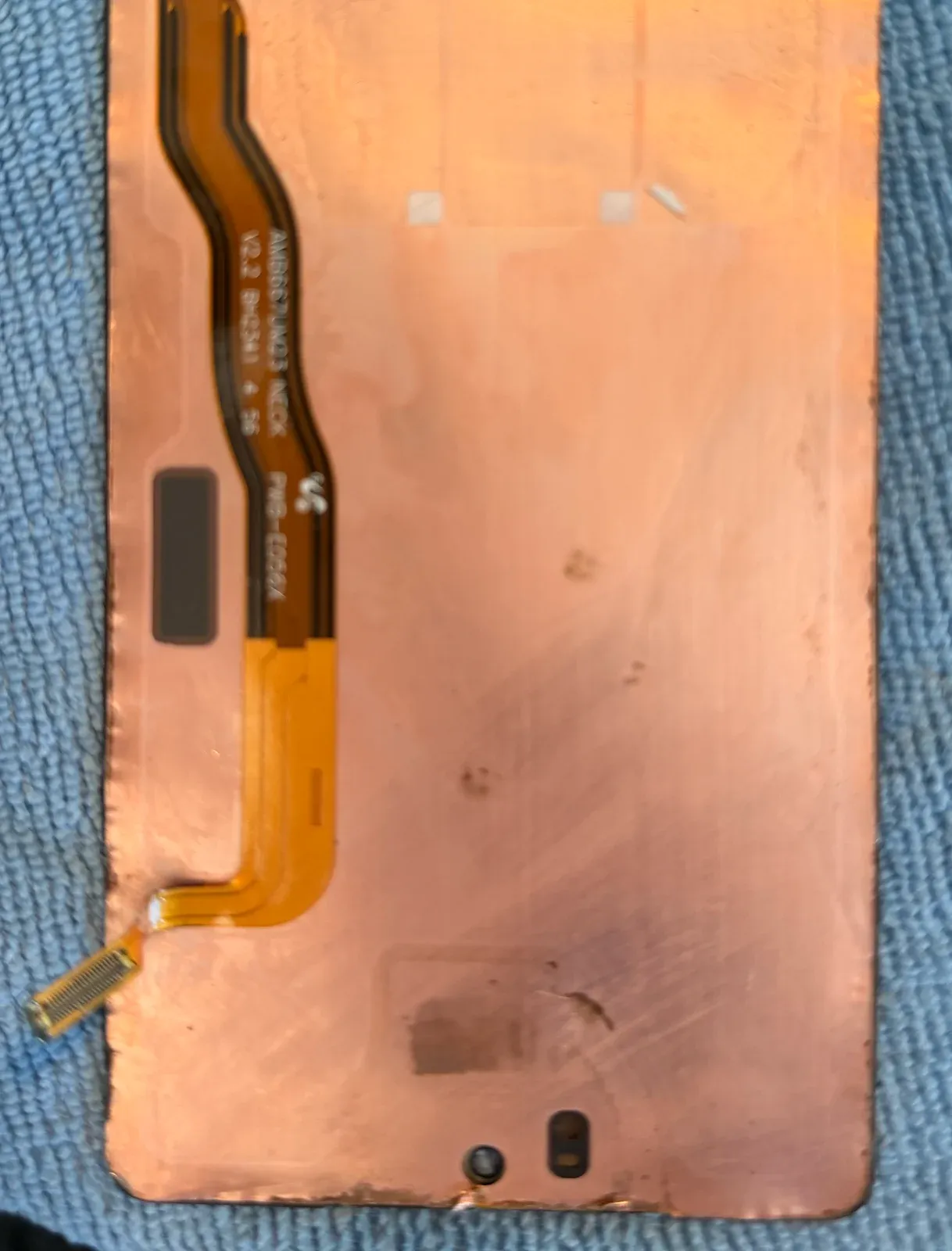
The removed display assembly separates a visible failure from the larger question of whether the phone can still run and provide authorized access to data.
Follow the evidence of liquid
Liquid damage is not always a single broken component. Residue can collect around connectors or nearby parts. Corrosion can change a connection over time. An area that looks acceptable from one angle may deserve a closer inspection from another.
The photographic record contains repeated views of the same small regions. That repetition is useful at the bench even though an article does not need to print every frame. It lets an inspection become more precise: the connector end, the neighboring contact, the reverse side of a cable, the board socket it meets.
Visible residue gave the inspection places to start. It did not settle the diagnosis. A photograph cannot tell us a resistance value or prove that a particular component caused the failure. Those conclusions require testing, not just a convincing close-up.
Good diagnosis keeps observation and explanation separate long enough to avoid turning an early guess into the whole repair plan.
Clean first, power second
There is a general principle behind cautious liquid-damage work: do not repeatedly apply power to an uncertain, contaminated assembly in the hope that it will improve.
Cleaning and inspection are part of making the next test meaningful. Otherwise a changing patch of residue can make the behavior seem inconsistent, and a new power attempt can add another failure to the original one.
This is not a cleaning recipe. The right treatment depends on the part, the contamination, the battery condition, and the damage already present. Some assemblies cannot be made dependable by cleaning alone. Some should not be powered again until a specialist has evaluated them.
The aim is to reach a condition where testing answers a question. If a connector remains contaminated or a cable cannot sit properly, the next power attempt may tell you very little. Taking the time to inspect that connection is part of the diagnosis, even when it produces no dramatic moment to photograph.
The small connections deserve their own questions
The USB-C area and the cables between assemblies received close attention in the photographs. A smaller board, often called a daughterboard, carries functions away from the main board. Flat connecting cables, or flex cables, carry signals between sections of the phone.
A flex cable can look too simple to deserve much attention. It is easy to treat it as a passive strip between the important parts. In practice, both ends matter. So do the sockets, the routing, and the condition of the conductors inside it.
The images show cable ends, connector pins, and board contacts examined separately. That approach is useful because changing several parts at once can obscure which change affected the result. A known-good comparison, when available, is more informative when the rest of the setup stays the same.
Electrical tests belong to this same discipline. A continuity check asks whether a path connects. A resistance measurement asks how strongly a path opposes current. Neither becomes a diagnosis without context. A meter reading needs an expected comparison and an understanding of the circuit being measured.
A flex connector becomes its own inspection task. The cable and the socket at each end can be considered separately.
Getting a view of a running phone
When the built-in display cannot do its job, the next question is whether another supported display or control path can help. That question is specific to the device and its remaining hardware.
An external display is one possible avenue on supported hardware. It still depends on the connections and electronics needed to produce that output. A damaged charging or data connection may complicate the same route that would otherwise help with a failed screen. It is a possibility to evaluate, not an automatic escape hatch.
What is verified is the later connection to Android itself. The terminal photograph shows the phone identifying its model and operating-system version and accepting file-copy requests. By that stage, enough of the original device was functioning to communicate.
That is a more useful piece of evidence than an unexplained “it turned on.” It describes a capability that mattered directly to the recovery.
Trusted access was a boundary, not an obstacle to defeat
Android Debug Bridge, usually shortened to ADB, is a tool developers use to communicate with an Android device. In this case, the record shows a wireless connection and commands reading from user-accessible storage.
A working ADB connection requires the appropriate device authorization. It is not a magic way around a person's lock or a substitute for their permission. The available record shows that access existed during recovery. It does not show exactly when the trust relationship was first established, so we are not claiming it predated the damage.
That distinction matters for anyone reading this because their own phone has failed. A technique that works with an already accessible device is not a promise that the same route will work with a locked or unresponsive one.
The public article also does not need the connection address, device identifier, or commands from the client's screen. Those stay out of the published images.
Copy, check, and keep the exceptions
The terminal record contains a small but important setback: a request for an expected camera-photo folder returned a missing-directory error. Other folder-copy operations succeeded.
This is exactly the sort of detail that a triumphant repair story can lose. The first expected path is not always the right path, and a successful command is not the same as a complete account of someone's data.
A careful recovery needs a record of what copied, what was empty, what could not be found, and what still needs review. Verification can include comparing file lists and sizes, opening representative files, and retaining a separate copy before migration. Those are validation practices, not a claim that this photograph documents every one of them.
The result here was recovered data the owner could use again. That is worth celebrating without attaching an unverified total or saying that every possible file was accounted for. The difference matters when someone else is deciding what to expect from their own damaged device.
Returning data is different from replacing a phone
Migration brings another set of questions. Existing cloud copies may overlap with recovered folders. Applications may keep their information somewhere other than a normal photo directory. The destination device may organize files differently.
A recovered copy should therefore be treated as something to preserve before making broad changes. Sorting out duplicates is easier when an original recovery copy remains intact. Deleting first and discovering a mismatch later is the wrong kind of excitement.
Privacy belongs in this stage too. The owner's photographs are the purpose of the work, not promotional material for the repair. No personal gallery, contact list, or conversation is reproduced in this feature.
What this case teaches
The strongest lesson is patience with partial function. A failed screen, a suspect connector, and an accessible operating system can exist in the same damaged phone. The job is to understand that mixture without destroying the parts still needed for recovery.
The next improvement to the process is equally practical: keep a structured test log alongside the photographs, record the display setup, and preserve a final recovery manifest. That would make the technical handoff stronger and leave fewer gaps when explaining the work later.
Every liquid-damaged device is different. This recovery worked because enough of the original electronics remained functional. It is not a guarantee for another phone.
For this one, the useful ending was not a device looking new. It was data that the owner could access again.